
Research Product
Research one Amazon product (ASIN) that is not in the Launch Fast catalog, or refresh one that is.
| Field | Value |
|---|---|
| MCP tool | research_ |
| Behavior | Starts research work. It does not change your Amazon account. |
| Cost | 1 credit when any part of the research starts new work. Free when every part is still fresh, or when the same research runs at that time. |
| Permission | Research and insights (Launch Fast tools) |
| Amazon connection | Not necessary |
| App view | ui://launchfast/v2/product |
What It Does
research_product captures one Amazon US product. It reads the sales and price of the product, the keywords it ranks for, matching suppliers, and the markets it belongs to.
Each part stays fresh for a set time: the sales and price data and the keywords for 1 day, the market match for 7 days, and the suppliers for 30 days. Only the parts that are not fresh run again.
The research usually finishes in less than one minute. The tool waits up to 40 seconds. If the research does not finish in that time, the answer gives a job id for get_job.
When To Use It
Use research_product when get_product finds no product, or when the product data is out of date. To read a product that is in the catalog, use get_product. It is free.
Inputs
| Input | Required | Values | Example |
|---|---|---|---|
asin | Yes | 10 letters and digits in all letter cases, or an Amazon product link | B0C1EXAMPL |
What The Answer Contains
- When the research finishes in 40 seconds, the answer is the product brief. It is the same brief that
get_productgives. - A notice says if the call spent 1 credit, or if it was free because you joined a research of this product that was already running.
- If the keyword, supplier, or market part takes longer, that section of the brief says so. The answer gives the call to read it later, for example
get_productwithview=keywords. - When the research takes longer than 40 seconds, the answer gives the job id and the next call to make. If you joined a research of this product that someone else started, the next call is
research_productagain, notget_job. - When every part is still fresh, the answer is the brief, free of charge.
App View
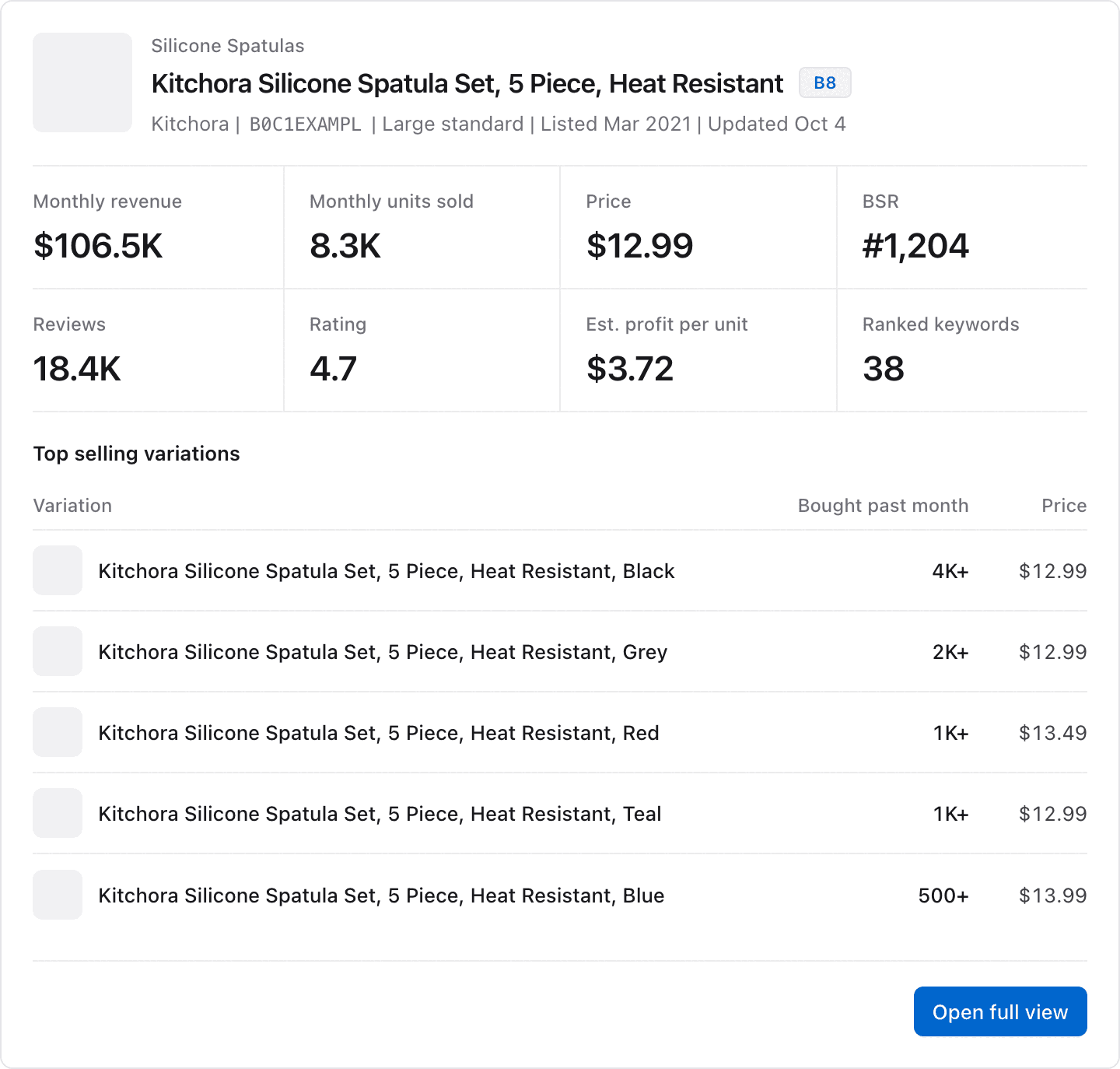
When the research finishes and your AI app supports MCP Apps, it shows the result in this view. The image shows example data.
Example Prompts
B0C1EXAMPL is not in Launch Fast yet. Research it and show me the brief.Refresh the Launch Fast data for B0C1EXAMPL. The numbers look old.Common Errors
| Error | What it means | What to do |
|---|---|---|
credit_ | You used all your credits for this billing period. | See credits used and left on the usage page. Catalog reads stay free. |
plan_ | Your plan does not include market research. | Check your plan on the usage page. |
invalid_ | The ASIN has the wrong format. | Use a 10-character ASIN or an Amazon product link. |
not_ | Nothing new ran, and the ASIN is not in the catalog yet. | Try get_ in a few minutes. |
upstream_ | Launch Fast could not find the ASIN on Amazon US, the research did not finish, or product research is not available at this time. | Check the ASIN. Then try the same call again in a minute. |
Related Tools
get_productreads the product when the research finishes.get_jobchecks a research that takes more than 40 seconds.save_to_launch_listsaves the product to your Launch List.