
Amazon Ads Entity Graph
See your Sponsored Products campaigns, ad groups, targets, and search terms in one graph.
| Field | Value |
|---|---|
| MCP tool | amazon_ |
| Behavior | Read-only. It does not change campaigns, ad groups, targets, keywords, bids, budgets, or other Ads settings. |
| Cost | Free and instant |
| Permission | Campaign structure (Amazon Ads tools). Amazon verification is necessary. |
| Amazon connection | Amazon Ads |
| App view | ui://launchfast/v2/amazon-ads-entity-graph |
What It Does
amazon_ads_entity_graph_lookup reads the Amazon Ads reports that Launch Fast synced. It shows how your Sponsored Products account fits together:
- Each campaign and its ad groups.
- The keywords and targets in each ad group, with their bids and figures.
- The shopper search terms that each target matched.
A search term is what a shopper typed. It is not always a target that you can bid on. The keyword_text, match_type, campaign, and ad group show what you can bid on.
One call covers up to 365 days and up to 50 rows. The campaign_graph action shows up to 10 campaigns, each with its 6 biggest ad groups by spend. Each target row lists its 5 biggest search terms by spend. Ratios are fractions: 0.34 is 34%.
Row Warnings
Each row can carry warnings:
| Warning | Meaning |
|---|---|
search_ | No keyword stands behind these search terms, so you cannot bid on them directly. |
bid_ | Launch Fast knows no bid for the target. |
search_ | Search term figures with no matching target row in this date range. |
no_ | The target matched no search terms in this date range. |
When To Use It
| Your question | Tool to use |
|---|---|
| How is my account built, and which target brings which searches? | amazon_ |
| A ranked list of targets with daily figures | amazon_ |
| Search terms only | amazon_ |
Use this tool before an ad change. It gives the correct campaign, ad group, keyword, and match type for the change tools.
Inputs
| Input | Required | Values | Example |
|---|---|---|---|
action | No | summary (default: target rows and the campaign graph), campaign_ (the same), target_ (target rows only), search_ (target rows, plus one row for each search term and target) | search_ |
campaign_ | No | One campaign name, as the rows show it | SP - Water Bottle - Exact |
campaign_ | No | One campaign_ from a campaign row | 123456789012345 |
ad_ | No | One ad_ from a row | 234567890123456 |
keyword_ | No | One keyword | water bottle |
keyword_ | No | BROAD, PHRASE, EXACT, or TARGETING_ | EXACT |
match_ | No | One match type, as the rows show it | BROAD |
targeting | No | One targeting expression | asin="B0C1EXAMPL" |
search_ | No | One shopper search | insulated water bottle |
date_, date_ | No | YYYY-MM-DD, inclusive. The default is the last 30 days. | 2026-09-01 |
marketplace_ | No | One marketplace id, as the accounts show it | ATVPDKIKX0DER |
sort_ | No | The order of target and search term rows: spend (default), sales_, roas_, orders_, clicks (highest first), or acos_ (lowest first) | roas_ |
limit | No | Rows, 1 to 50. The default is 15. | 25 |
account_ | No | Leave it out. The Launch Fast in-app assistant sets it. |
What The Answer Contains
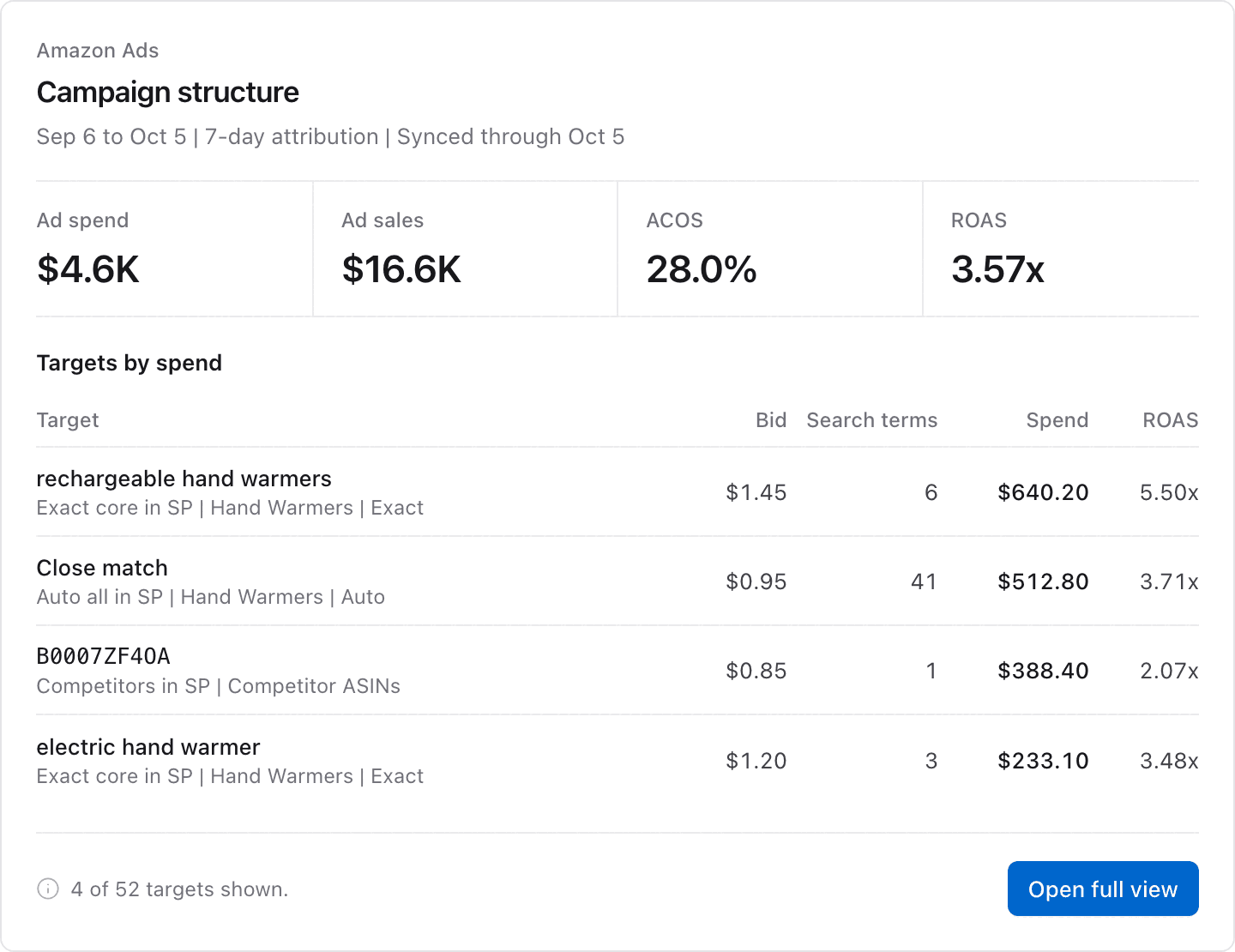
- Target rows: the keyword or target, match type, bid, campaign, ad group, figures, and its top search terms.
- The campaign graph: campaigns and their biggest ad groups, each with its figures and its counts of targets and search terms.
- For
search_term_graph, one row for each pair of search term and target. - Warnings on each row, as the table above shows.
- The sync status, the latest synced day, and a sentence that the assistant passes on to you.
- Notices. If you left out some Amazon permissions when you connected, a notice names them. If the answer is too large, it leaves out rows and a notice says how to get them.
App View
When your AI app supports MCP Apps, it shows the answer in this view. The image shows example data.
Example Prompts
Show how my Sponsored Products campaigns are built, with the ad groups and keywords in each.Which of my keywords brought the search "insulated water bottle"?Which search terms have no keyword behind them, so I cannot bid on them directly?Common Errors
| Error | What it means | What to do |
|---|---|---|
not_: "No Amazon Ads account is connected to Launch Fast." | Amazon Ads is not connected. | Connect Amazon Ads in Launch Fast Settings > Amazon. See Amazon Ads setup. |
not_: "The Amazon Ads connection needs to be reconnected." | The Amazon Ads connection must be connected again. | Open Settings > Amazon in Launch Fast and choose Reconnect. |
mfa_ | Amazon access for this AI app ended. | Verify again in Launch Fast under Settings > MCP & API keys. See Authentication. |
| Empty result | No synced rows match the dates or filters. | Try a wider date range. Remove the campaign, ad group, and keyword filters. |
invalid_ | limit is not 1 to 50, the range is more than 365 days, or a value is not valid. | Use a limit of 1 to 50 and a range of 365 days or less. |
Related Tools
set_ad_bidschanges the bid of a target from the graph.add_ad_keywordsadds a search term as a keyword.add_negative_keywordsblocks a search term.