
Find Suppliers
List the suppliers that Launch Fast found for a product phrase, a market, or an ASIN.
| Field | Value |
|---|---|
| MCP tool | find_ |
| Behavior | Read-only |
| Cost | Free and instant |
| Permission | Research and insights (Launch Fast tools) |
| Amazon connection | Not necessary |
| App view | ui://launchfast/v2/suppliers |
What It Does
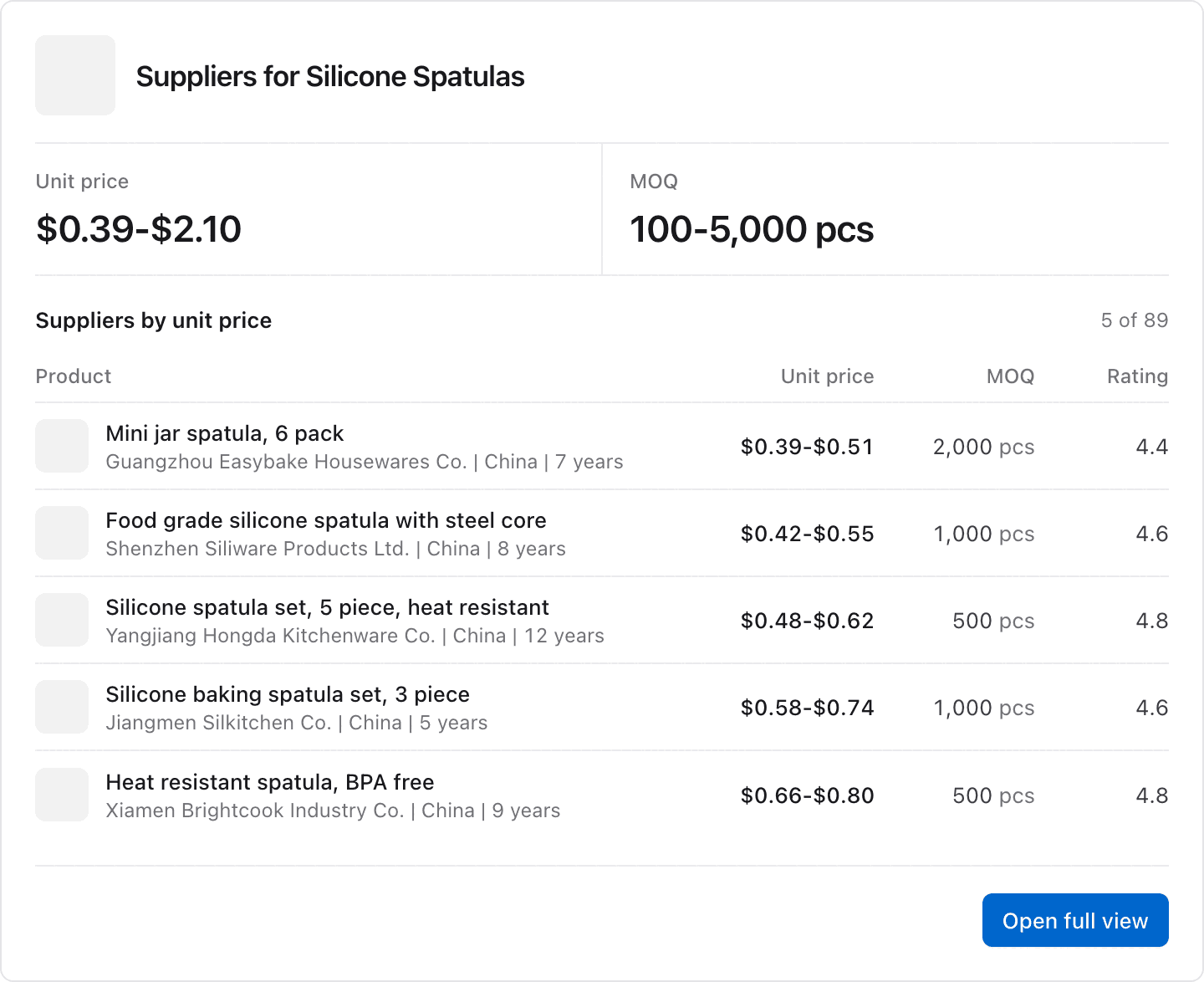
find_suppliers lists the suppliers that Launch Fast has for a product phrase, a market, or an ASIN. Each row shows the unit price in US dollars, the MOQ with its unit, the rating, the years in business, and the country.
The list holds up to 50 suppliers. They have labels from s1 to s50, in the chosen order. The default order is cheapest first. Each page shows 10 suppliers by default. Filters make the list shorter. For a product phrase, each row is a supplier listing, so one company can show more than once.
When To Use It
Use find_suppliers first for each sourcing question. If it finds nothing for a phrase, use research_suppliers to search for that phrase.
Inputs
Give one of query, market, or asin.
| Input | Required | Values | Example |
|---|---|---|---|
query | One of three | A product phrase, up to 200 characters | silicone spatula |
market | One of three | A market slug or name | silicone-spatulas |
asin | One of three | An ASIN or Amazon product link | B0C1EXAMPL |
max_ | No | Highest unit price in US dollars, above 0 | 2 |
max_ | No | Highest minimum order quantity, a whole number from 1 | 500 |
min_ | No | Lowest supplier rating, 0 to 5 | 4.5 |
min_ | No | Fewest years in business, a whole number from 0 | 3 |
sort | No | unit_ (default, cheapest first), best_, moq (lowest first), rating (highest first), years (most first) | rating |
limit | No | Rows on each page, 1 to 50. The default is 10. | 25 |
cursor | No | The next_ value from the previous answer | c10.k3mzqa |
response_ | No | concise (default) or detailed | detailed |
What The Answer Contains
- The number of suppliers, the unit price range, and the MOQ range.
- The countries of the matching suppliers, for example "All in China."
- A table with one row for each supplier: label, company, unit price, MOQ, MOQ unit, years, rating, and country.
- With
response_format=detailed, the table adds reviews and the supplier URL. It adds lead time when a supplier has one, and for anasinlist, the match type (exactorsimilar).
Some suppliers have no price in US dollars for each item. They are not in the price range or the price filter, and sorting by unit price puts them last. A notice gives their number, and an other_price column shows their price when Launch Fast has one.
A supplier with a rating of 0 has no rating yet, so its rating is empty. The card shows a dash. A min_supplier_rating above 0 leaves these suppliers out.
The get_market and get_product suppliers views return this same list.
App View
When your AI app supports MCP Apps, it shows the answer in this view. The image shows example data.
Example Prompts
Find suppliers for silicone spatulas with a unit price under $2 and an MOQ under 500.Who supplies products like B0C1EXAMPL? Show the highest-rated suppliers first.Common Errors
| Error | What it means | What to do |
|---|---|---|
| No suppliers | Launch Fast has no suppliers for that phrase, market, or ASIN yet. | For a phrase or a market, ask the assistant to run research_. For an ASIN, use research_. |
invalid_ | The call gave more than one of query, market, and asin, or none, or a filter value is out of range. | Give one of the three, and use the values in the inputs table. |
not_ | No market in the catalog matches market. | Search with find_ first, or give a product phrase as query. |
plan_ | Your plan does not include this supplier list. | Check your plan on the usage page. |
Related Tools
research_supplierssearches for suppliers for a new phrase.get_productgives the estimated profit for each unit of a product.