
Research Keywords
Start a keyword research that compares all keywords that 1 to 15 Amazon products rank for.
| Field | Value |
|---|---|
| MCP tool | research_ |
| Behavior | Starts research work. It does not change your Amazon account. |
| Cost | 1 credit for each research. The same products again are free until the time that the answer gives, which is the end of a 10-minute window. After that time, the same products start a new research for 1 credit. |
| Permission | Research and insights (Launch Fast tools) |
| Amazon connection | Not necessary |
| App view | ui://launchfast/v2/keyword-research |
What It Does
research_keywords finds the keywords that 1 to 15 Amazon US products rank for. It compares the products side by side. Each product gets a label: P1, P2, P3, and so on. If you give your own ASIN, the research also shows your keyword gaps.
A research usually takes 1 to 3 minutes. If it finishes in 40 seconds, the answer has the brief. If not, the answer gives a job id for get_job.
A research that you start here is not in your saved researches. To add it, use save_keyword_research with the kr- id from the answer. Until you save it, the list from get_keyword_research names your newest unsaved researches from the last 7 days by their kr- ids, so a new chat can find them.
When To Use It
Use research_keywords for a new comparison. To read a research that you have, use get_keyword_research. It is free.
Inputs
Give asins or market. Do not give both.
| Input | Required | Values | Example |
|---|---|---|---|
asins | One of asins or market | 1 to 15 ASINs or Amazon product links, in all letter cases | ["B0C1EXAMPL", "B0D2EXAMPL"] |
market | One of asins or market | A market slug or name. The research uses the top 15 products of the market by revenue. | silicone-spatulas |
my_ | No | Your own ASIN. Launch Fast adds it to the products if it is not in the list. It counts toward the 15. | B0E3EXAMPL |
What The Answer Contains
The brief contains:
- A legend that names each product as P1, P2, and so on, with its ASIN, brand, and 30-day sales.
- The total number of keywords and the total search volume.
- With
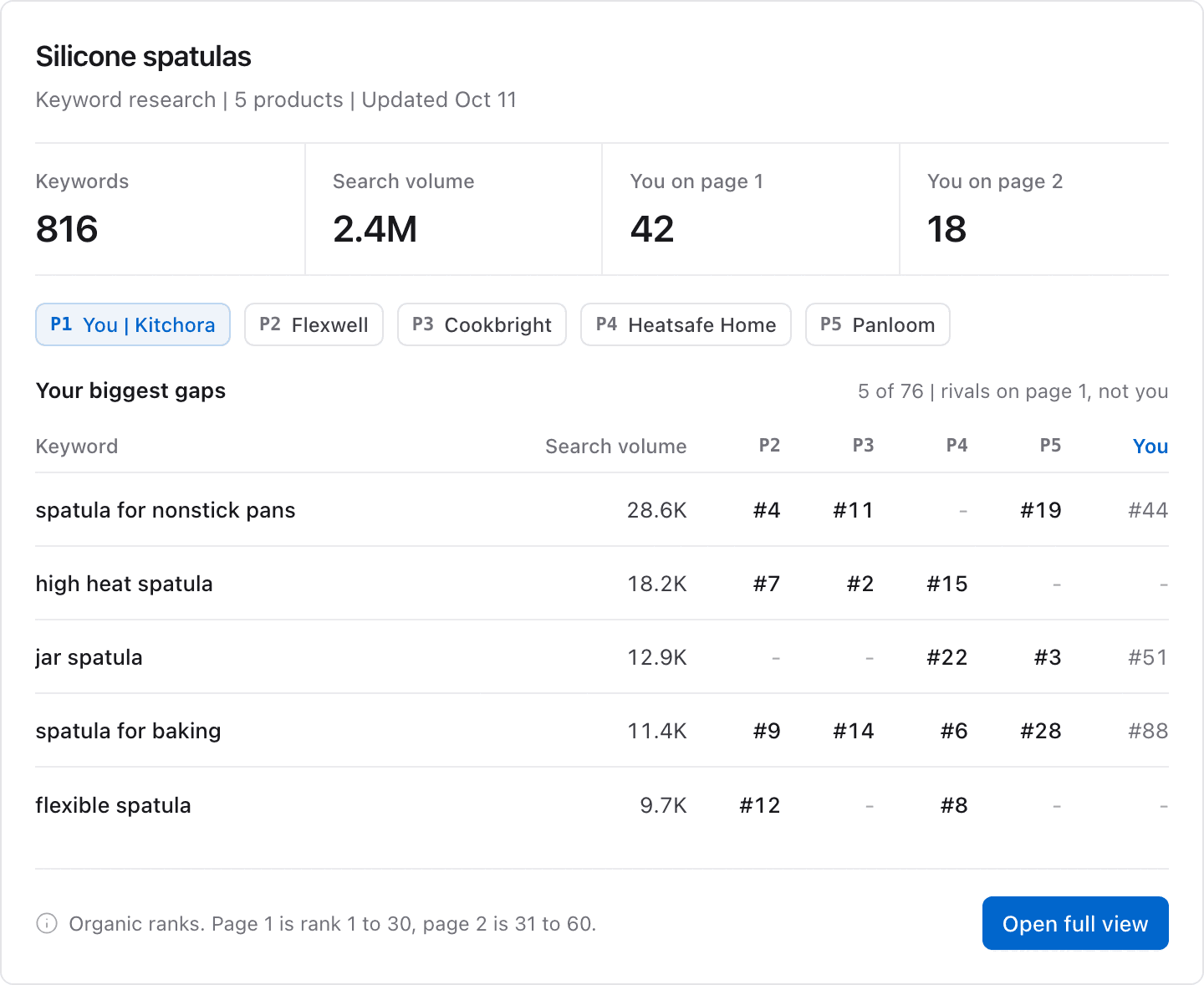
my_asin: the number of your keywords on page 1, on page 2, beyond page 2, and not ranked. - The top 10 keyword roots, with search volume, keyword count, and competitor coverage.
- The page 1 coverage of each competitor: its keywords on page 1, and their share of its search volume.
- With
my_asin: the 10 biggest keyword gaps. - The
kr-id of the research, and the next calls to make.
Page 1 is ranks 1 to 30. Page 2 is ranks 31 to 60. If some products return no keywords, a notice names them.
App View
When the research finishes and your AI app supports MCP Apps, it shows the result in this view. The image shows example data.
Example Prompts
Compare the keywords of the top products in the silicone spatulas market.Run keyword research on B0C1EXAMPL and B0D2EXAMPL against my ASIN B0E3EXAMPL. Where are my gaps?Common Errors
| Error | What it means | What to do |
|---|---|---|
invalid_ | The call gave both asins and market, or neither, more than 15 ASINs, or a value that is not a 10-character ASIN. | Give asins or market, and up to 15 valid ASINs. |
invalid_ | A research with the same products started a short time ago with different details. | Wait 10 minutes, or read your researches with get_. |
not_ | The market phrase matches no market, or the market has no products yet. | Give ASINs, or research the market first with research_. |
credit_ | You used all your credits for this billing period. | See credits used and left on the usage page. |
plan_ | Your plan does not include keyword research. | Check your plan on the usage page. |
Related Tools
get_keyword_researchreads the research in more detail.save_keyword_researchsaves the research to your list.get_jobchecks a research that takes more than 40 seconds.