
Get Keyword Research
List your saved keyword researches, or read one research as a brief or a detailed view.
| Field | Value |
|---|---|
| MCP tool | get_ |
| Behavior | Read-only |
| Cost | Free and instant |
| Permission | Research and insights (Launch Fast tools) |
| Amazon connection | Not necessary |
| App view | ui://launchfast/v2/keyword-research |
What It Does
get_keyword_research reads your keyword researches.
- With no
researchinput, it lists your saved researches. It also names up to 5 of your newest unsaved researches from the last 7 days by theirkr-ids. - With a research name or
kr-id, it returns a brief or one detailed view. If the first run of the research has not finished, the answer shows the job status, asget_jobdoes.
Ranks show as one text value over the legend of products, and only where a product ranks. For example, P1:3 P2:12 means that P1 ranks 3 and P2 ranks 12. P1 and P2 are products, not pages. Page 1 is ranks 1 to 30. Page 2 is ranks 31 to 60.
When To Use It
Use get_keyword_research to read a research that you have. To start a new research, use research_keywords. Its answer gives the kr- id to read here.
A research that you start in an AI app is not in the saved list until you save it with save_keyword_research. You can read it by its kr- id at all times. A name finds only your newest 1,000 saved researches. For an older one, use its kr- id.
Inputs
| Input | Required | Values | Example |
|---|---|---|---|
research | No | A research name or its kr- id. Leave it out to list your saved researches. | Silicone Spatulas |
view | No | brief (default), roots, keywords, ranks | keywords |
keyword_ | No | For view=keywords: a keyword group. See the table below. | missing |
root | No | For view=keywords: only keywords under this root | spatula |
keywords | No | For view=ranks: 1 to 25 keywords from the research | ["silicone spatula"] |
min_, max_ | No | For view=roots and keywords: the search volume range | 1000 |
sort | No | roots: search_ (default), keywords, gap_. keywords: search_ (default), relevancy, cpc, bid. | relevancy |
limit | No | Rows on each page, 1 to 100. The default is 25. | 50 |
cursor | No | The next_ value from the previous answer | c25.k3mzqa |
response_ | No | concise (default) or detailed | detailed |
| Keyword group | Rule |
|---|---|
core | All products rank. |
contested | 2 or more competitors rank on page 1. |
open-ground | Half or more of the products rank, but no competitor is on page 1. |
long-tail | Fewer than 1,000 searches. |
defend | Your ASIN is on page 1. |
striking-distance | Your ASIN is on page 2. |
missing | Competitors are on page 1, but your ASIN is not. |
The defend, striking-distance, and missing groups work only for a research that has my_asin.
What The Answer Contains
| View | Contents |
|---|---|
| List | One row for each saved research, newest first, from your newest 1,000 saved researches: name, kr- id, products, your ASIN, keyword count, and the date it was last updated. A notice names up to 5 unsaved researches from the last 7 days by kr- id, with the day each started. If those cannot be read, the notice is left out and the saved list still answers. |
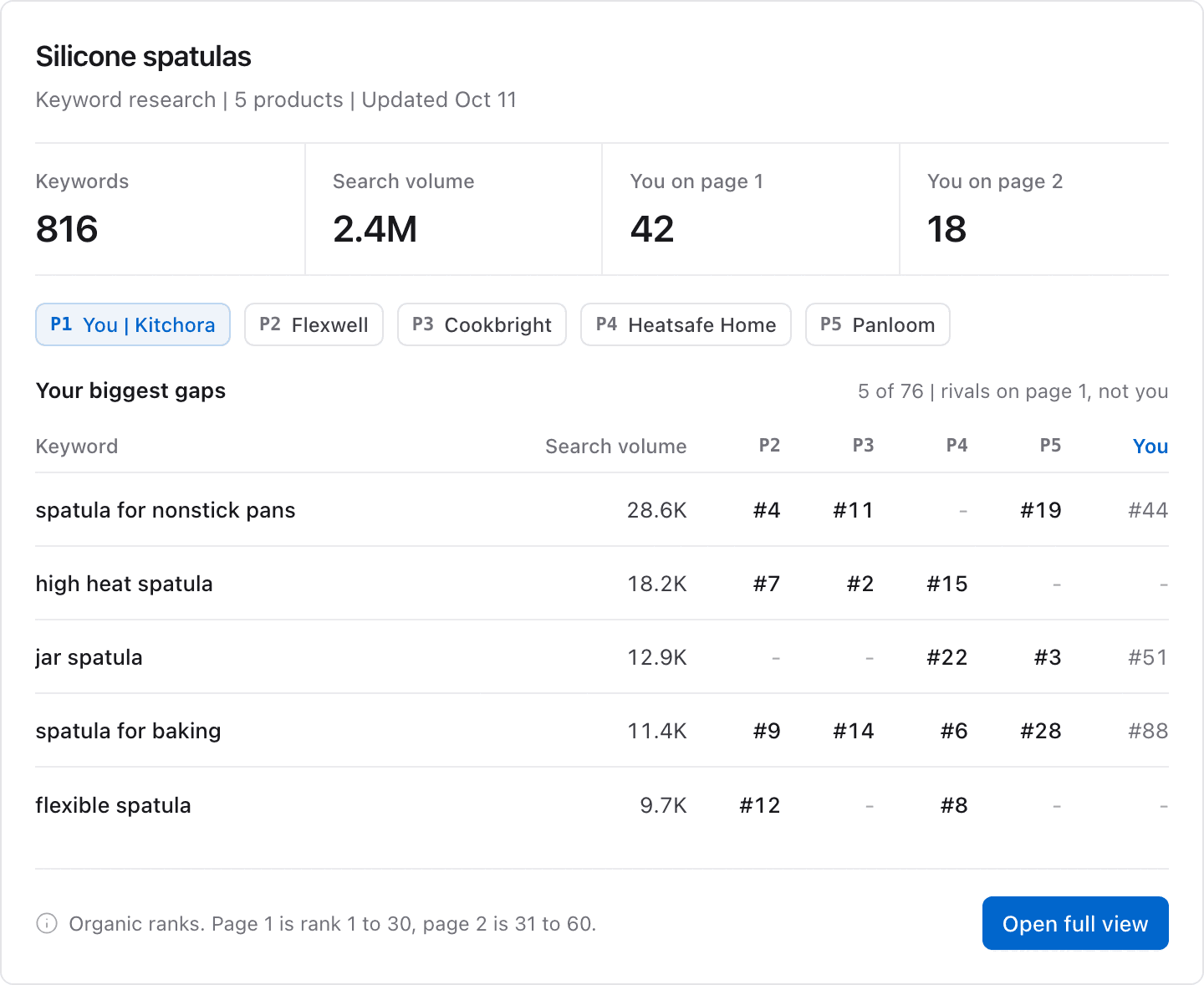
brief | The legend of products, totals, top 10 roots, page 1 coverage of each competitor, and your biggest gaps. |
roots | One row for each keyword root: search volume, keyword count, competitor coverage, your coverage and gaps (for a research with my_), and the best competitor rank. |
keywords | One row for each keyword: search volume, number of ranking products, ranks, page 1 count, and your rank. |
ranks | For the keywords that you name: organic ranks, sponsored ranks, and traffic share for each product. |
With response_format=detailed, the keywords view adds cost for each click, highest bid, purchases, and title density.
App View
When your AI app supports MCP Apps, it shows the answer in this view. The image shows example data.
Example Prompts
List my saved keyword researches in Launch Fast.In my Silicone Spatulas research, show the keywords where competitors are on page 1 and I am not.Show the ranks of each product for "silicone spatula" and "heat resistant spatula".Common Errors
| Error | What it means | What to do |
|---|---|---|
not_ | No research has that name or id. A name finds only your newest 1,000 saved researches. | List your researches with no research input. For a new research, or an older saved one, use its kr- id. |
invalid_ | A name matches more than one research. | Use the kr- id from the list in the answer. |
invalid_ | A keyword group or sort=gap_ works only with my_. | Run research_ again with my_. |
plan_ | Your plan does not include keyword research. | Check your plan on the usage page. |
Related Tools
research_keywordsstarts a new research.save_keyword_researchsaves a research to your list.