
Find Markets
Search the Launch Fast catalog of Amazon markets by name, or browse markets with saved views and filters.
| Field | Value |
|---|---|
| MCP tool | find_ |
| Behavior | Read-only |
| Cost | Free and instant |
| Permission | Research and insights (Launch Fast tools) |
| Amazon connection | Not necessary |
| App view | ui://launchfast/v2/market-list |
What It Does
find_markets finds Amazon markets in the Launch Fast catalog. A market is a product niche, such as silicone spatulas. You can search by name, or browse all markets with a saved view, filters, and a sort order.
A name search returns up to 5 matches. Browsing covers all markets in the catalog, with up to 100 rows on each page.
When To Use It
Use find_markets first for each market question. It is free, so the assistant can search before it starts paid research.
| Your goal | Tool to use |
|---|---|
| Find or browse markets | find_ |
| Open one market in detail | get_ |
| Research a market that is not in the catalog | research_ |
| Find single products | find_ |
Inputs
All inputs are optional. With no input, the tool browses all markets by revenue.
| Input | Required | Values | Example |
|---|---|---|---|
query | No | A market name or phrase, 2 to 120 characters | silicone spatula |
view | No | all (default), trending-up, low-competition, emerging, high-revenue | low-competition |
category | No | A category name, or part of it, in all letter cases | kitchen |
min_, max_ | No | 30-day revenue in US dollars. Text such as "$250K" is accepted. | 250000 |
min_, max_ | No | Average price in US dollars | 25 |
max_ | No | Highest average best seller rank | 20000 |
min_ | No | Fewest monthly searches for the main keyword | 10000 |
min_, max_ | No | Fewest or most products in the market | 150 |
sort | No | revenue, growth, price, search_, product_. The default is growth for trending-up and emerging, and revenue for the other views. | growth |
limit | No | Rows on each page, 1 to 100. The default is 25. | 50 |
cursor | No | The next_ value from the previous answer, copied without changes | c25.k3mzqa |
response_ | No | concise (default) or detailed | detailed |
Saved Views
| View | Rule |
|---|---|
all | No rule. All markets. |
trending-up | More than $250K revenue in 30 days, and more than 10% growth in 3 months. |
low-competition | Most sellers have fewer than 575 reviews, and the top 3 brands have less than 45% of revenue. |
emerging | The typical listing is less than 2 years old, and the market grows. |
high-revenue | More than $10M revenue in 30 days. |
The trending-up view leaves out markets that grow by less than 10%. To see all growing markets, use sort=growth instead.
What The Answer Contains
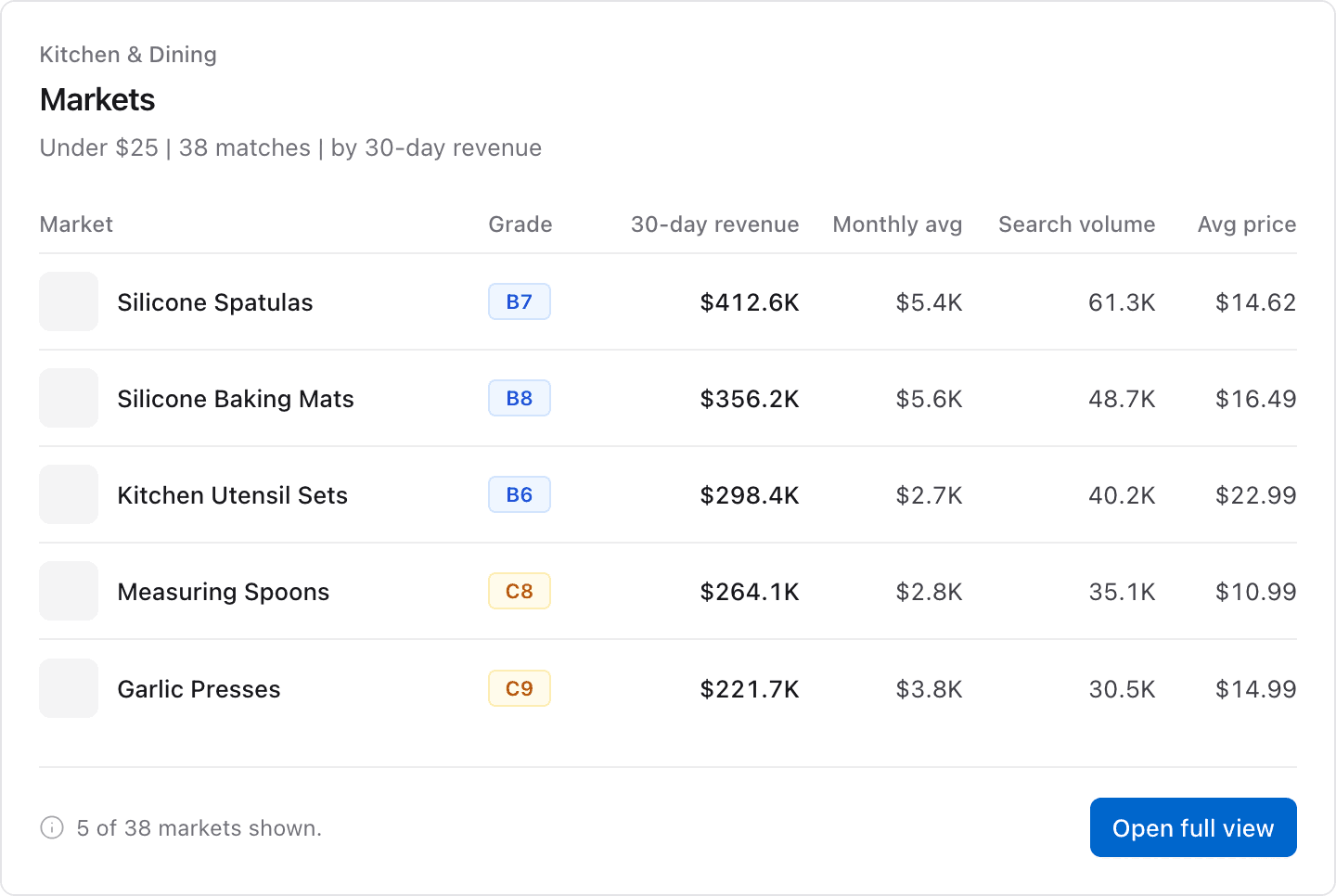
- A summary that gives the number of matching markets, the view rule, and the top market.
- A table with one row for each market. Each row shows the name, slug, grade, 30-day revenue, and average revenue for each product.
- Each row also shows the main keyword search volume, average price, 3-month growth, product count, and top 3 brand share.
- With
response_format=detailed, the table adds the category, average BSR, average rating, average reviews, median listing age, and the date of the data. - Paging data and the next calls, for example
get_marketfor the top market.
If a name search finds no market, the answer says so and suggests research_market for that phrase.
If category matches no category, the answer says so and lists some category names you can use.
App View
When your AI app supports MCP Apps, it shows the answer in this view. The image shows example data.
Example Prompts
Find Amazon markets for silicone spatulas in Launch Fast.Show me low-competition kitchen markets with more than $100K revenue in the last 30 days.Which markets in the Launch Fast catalog grow the fastest? Sort them by growth.Common Errors
| Error | What it means | What to do |
|---|---|---|
invalid_ | An input value is not valid, or a cursor belongs to a different query or to a list that changed since that page. | Use the values in the inputs table. To start a list again, remove cursor. |
plan_ | Your plan does not include market research. | Check your plan on the usage page. |
| No matches | The catalog has no market with that name. | Try a shorter phrase, or ask the assistant to run research_. |
Related Tools
get_marketopens one market from the list.research_marketadds a market that is not in the catalog.save_to_launch_listsaves a market to your Launch List.