
Research
Get Product
Open one Amazon product (ASIN) from the Launch Fast catalog as a brief, or as one detailed view.
| Field | Value |
|---|---|
| MCP tool | get_ |
| Behavior | Read-only |
| Cost | Free and instant |
| Permission | Research and insights (Launch Fast tools) |
| Amazon connection | Not necessary |
| App view | ui://launchfast/v2/product |
What It Does
get_product opens one Amazon US product from the Launch Fast catalog. The default answer is a brief. You can also open one detailed view. Row views return up to 100 rows on each page. The suppliers view returns up to 50 rows.
When To Use It
| Your goal | Tool to use |
|---|---|
| Check one ASIN | get_ |
| Find ASINs first | find_ |
| Add an ASIN that is not in the catalog, or refresh old data | research_ |
| Look at the whole market of the product | get_ |
Inputs
| Input | Required | Values | Example |
|---|---|---|---|
asin | Yes | 10 letters and digits in all letter cases, or an Amazon product link | B0C1EXAMPL |
market | No | For view=brief or history: a market slug or name that calibrates the sales estimate | silicone-spatulas |
view | No | brief (default), history, keywords, competitors, markets, suppliers | keywords |
min_ | No | For view=keywords: fewest monthly searches | 1000 |
max_ | No | For view=competitors: most reviews | 500 |
min_ | No | For view=competitors: lowest 30-day revenue in US dollars | 10000 |
max_, max_, min_, min_ | No | For view=suppliers: the supplier filters | max_ |
sort | No | The row order. The values change with the view. See the table below. | rank |
limit | No | Rows on each page, 1 to 100 (default 25). Suppliers: 1 to 50 (default 10). | 50 |
cursor | No | The next_ value from the previous answer | c25.k3mzqa |
response_ | No | concise (default) or detailed | detailed |
| View | Sort values (default first) |
|---|---|
keywords | search_, rank (best first), traffic_ |
competitors | revenue, sales, reviews, price |
markets | revenue |
suppliers | unit_ (cheapest first), best_, moq, rating, years |
history | Newest month first. No sort input. |
What The Answer Contains
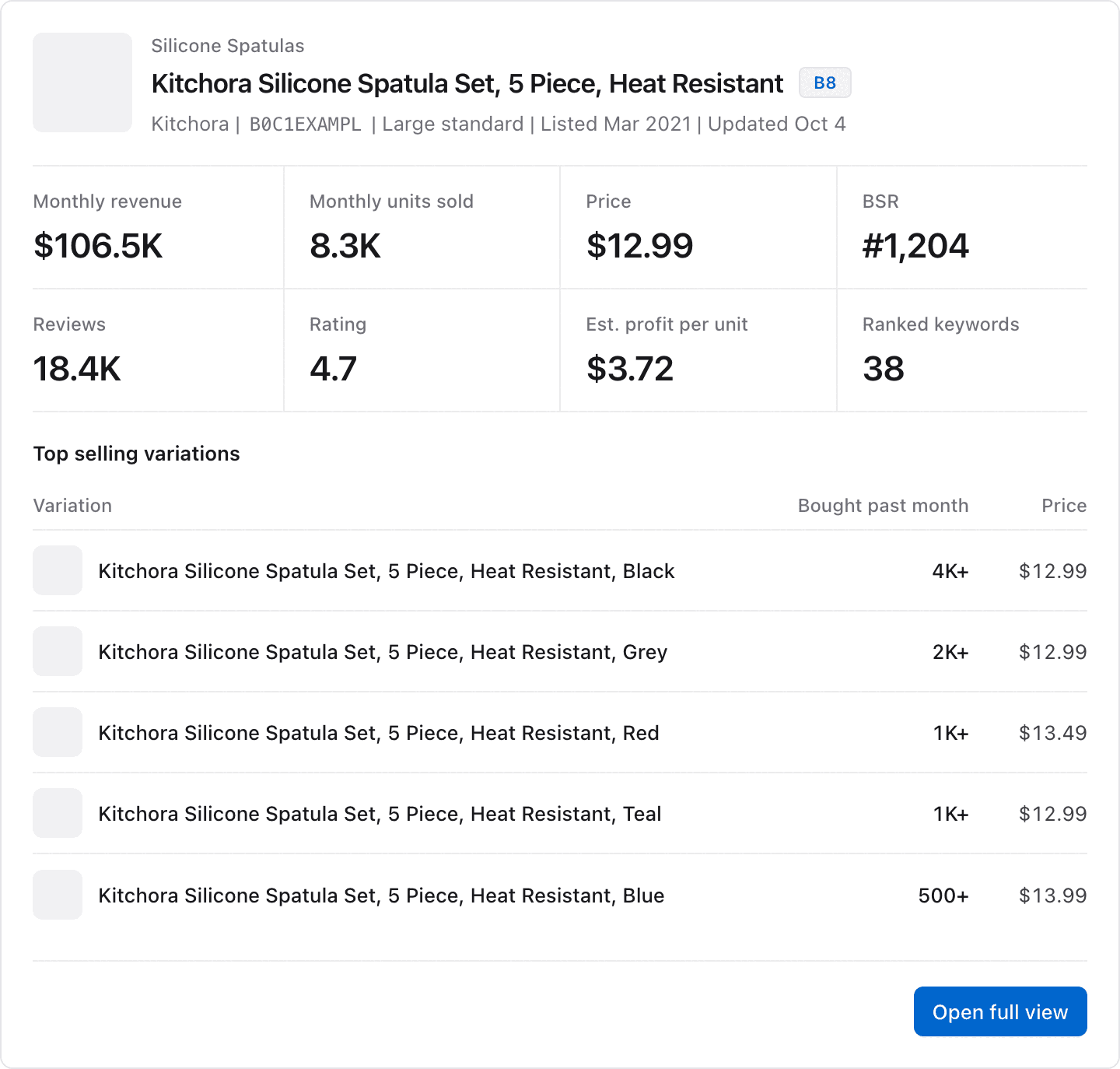
The brief contains:
- The ASIN, title, brand, and the date of the data.
- Price, current BSR, grade, size tier, and listing date.
- 30-day sales and revenue, with the confidence of the sales estimate, and 3-month growth.
- 12-month averages for revenue, units sold, and BSR.
- The estimated profit for each unit, when Launch Fast has one.
- Reviews, rating, and the number of ranked keywords.
- A 12-month trend, one line for each month.
- The top 5 selling variations, when the product has a variation family.
- The top 10 keywords by search volume, with the organic rank of the product.
- The markets that the product belongs to, and the number of matching suppliers.
If the keyword, supplier, or market data of the product is not complete yet, that section says so. It does not show an empty list. A notice also says when a refresh of the product runs at that time.
App View
When your AI app supports MCP Apps, it shows the answer in this view. The image shows example data.
Example Prompts
Check ASIN B0C1EXAMPL in Launch Fast. What are its sales, reviews, and profit for each unit?Which keywords does B0C1EXAMPL rank for? Sort them by rank.Show the competitors of B0C1EXAMPL that have fewer than 500 reviews.Common Errors
| Error | What it means | What to do |
|---|---|---|
not_ | The ASIN is not in the Launch Fast catalog, or market names no market that you can see. | Ask the assistant to run research_ for that ASIN. For market, search with find_. |
still_ | A product research you started for this ASIN runs now. | Check the job with get_ in about 60 seconds. |
invalid_ | The ASIN has the wrong format, or a filter or sort does not apply to the view. | Use a 10-character ASIN or an Amazon link. Use the filters for that view. |
plan_ | Your plan does not include market research. | Check your plan on the usage page. |
Related Tools
research_productadds or refreshes the ASIN.research_keywordscompares the keywords of this ASIN with other products.rank_tracker_managestarts nightly rank tracking for the ASIN.