
Smart Super URL
Create optimized Amazon URLs designed for product launches, external traffic campaigns, and ranking strategies. Each URL includes automatic link shortening and detailed click analytics so you can measure exactly how your marketing efforts perform.
Overview
Use Super URL Generator to:
- Create SEO-friendly canonical URLs with keywords embedded directly in the URL path
- Generate direct add-to-cart links that skip product pages and reduce purchase friction
- Build multi-product bundles with buy-together URLs for promotions and cross-selling
- Track each click with automatic link shortening and 30-day analytics history
- Organize campaigns with custom names, tags, and notes for easy management
- Export data to CSV for reporting and external analysis
Smart Super URL
Smart Super URL automatically finds and ranks keywords for your ASIN. Enter your product. Launch Fast analyzes the keywords, finds the best options, and removes brand names.
How Smart URL Works
Enter Your ASIN
Input your 10-character Amazon ASIN and select your target marketplace.
AI Analyzes Keywords
The system fetches keyword data and ranks results by opportunity score.
Brand Names Filtered
Launch Fast Agent removes trademarked and brand keywords for TOS compliance.
Select Your Keywords
Choose 1-5 keywords from the AI-curated list.
URL Generated
Creates a canonical URL with your selected keywords embedded.
How We Find Keywords
The Launch Fast agent analyzes thousands of keywords for your ASIN and surfaces only the best opportunities based on three criteria:
| Criteria | Target Range | Why It Matters |
|---|---|---|
| Search Volume | 5,000 – 12,000 | High enough demand to drive traffic, low enough to avoid hyper-competitive terms |
| SPR | 1 – 20 | Indicates ranking difficulty — lower SPR means fewer sales needed to rank on page one |
| Relevance | Must match product | AI verifies the keyword relates to your market and product title |
Keywords outside these ranges are filtered out automatically. Brand names, model names, and trademarked terms are also removed by Launch Fast Agent to keep your URLs TOS-compliant.
Example results for a wireless earbuds product:
| Keyword | Search Volume | SPR | Relevance |
|---|---|---|---|
| earbuds for running | 8,200 | 12 | 94% |
| wireless earbuds gym | 6,400 | 8 | 89% |
| bluetooth earbuds workout | 5,800 | 15 | 87% |
Smart URL vs Canonical URL
| Feature | Canonical URL | Smart URL |
|---|---|---|
| Keyword Selection | Manual | AI-powered |
| Brand Filtering | None | Automatic (Launch Fast Agent) |
| Research Required | Yes. You choose keywords | No — AI suggests best options |
| Best For | When you know your keywords | Discovery & launch campaigns |
| URL Format | Same | Same |
| Click Tracking | ✓ | ✓ |
Use Smart URL for a new product, external traffic campaign, or automatic keyword selection. Use Canonical URL when you know the target keywords.
How to Create Super URLs
Access Super URL Generator
Navigate to "Super URL" in the left sidebar under Launch tools to open the Super URL dashboard.
Create a New URL
Click the "Create URL" button to open the URL generator. Select your marketplace and URL type, then fill in the required fields based on your selection.
Copy and Use Your URL
when generated, you will receive both the full Amazon URL and a shortened tracking link. Copy the short URL to use in your marketing campaigns — clicks are tracked automatically.
View Analytics
Return to the dashboard anytime to see click statistics for all your URLs. Click a URL row to view detailed analytics including daily trends, device breakdown, and traffic sources.
URL Types
Safe URL Types
These URL types are generally considered compliant with Amazon's terms and safe for regular use.
| URL Type | Description | Best For |
|---|---|---|
| Smart URL ⭐ NEW | AI-powered keyword selection with automatic brand filtering | Product launches, external traffic when unsure which keywords to target |
| Canonical URL | SEO-friendly URLs with keywords in the path (e.g., amazon.com/wireless-earbuds/dp/ASIN) | External traffic from blogs, social media, paid ads |
| Add to Cart | Skips product page and adds directly to cart, reducing purchase friction | Promotions, flash sales, giveaways, high-intent traffic |
| Buy Together | Adds multiple products to cart at the same time (up to 10 products) | Bundle promotions, cross-selling, product launch combos |
| Targeted ASINs | Search results page showing only your specified ASINs (up to 50) | Product catalog showcases, comparison pages, brand landing pages |
| Clean Page | Product page without competitor ads or sponsored products | Customer support links, marketing materials, demos |
Advanced URL Types
| URL Type | Description | Risk Level |
|---|---|---|
| 2-Step Brand | Search filtered by brand name + keywords | High |
| 2-Step Storefront | Search within your seller storefront | Medium |
| 2-Step ASIN | Search filtered to show specific ASIN | High |
| 2-Step Secret | Uses hidden keywords parameter | High |
| 5-Star Review | Opens review page with rating pre-selected | Very High |
These URL types can be flagged by Amazon if used for ranking manipulation. They are designed for specific advanced strategies and must be used carefully and at your own risk.
URL Analytics
Dashboard Overview
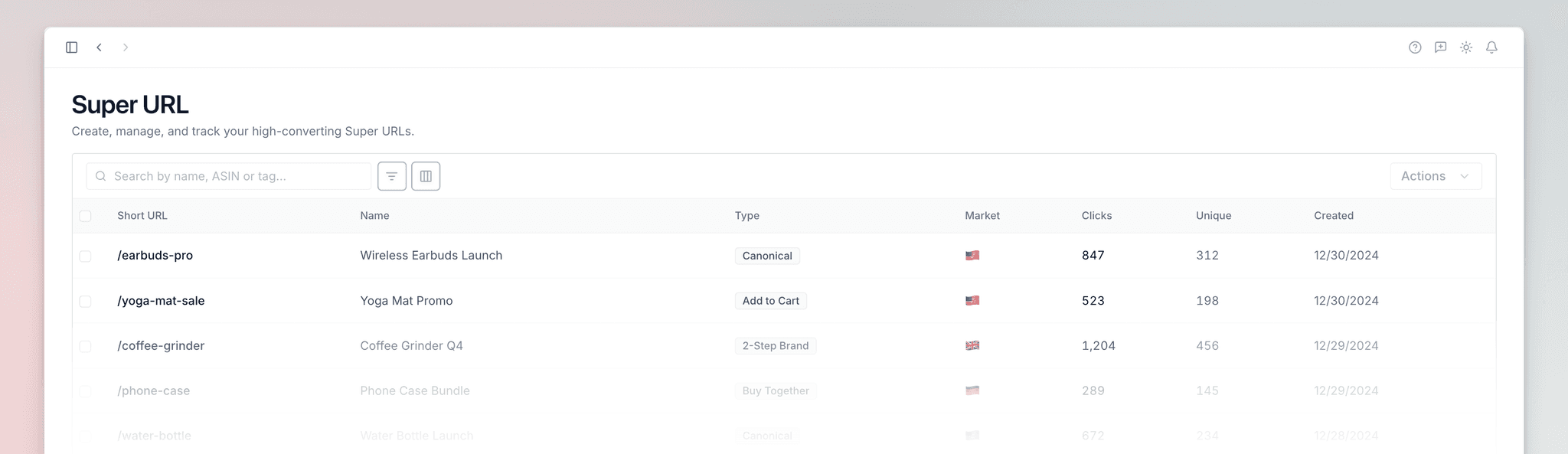
The main dashboard displays all your Super URLs with key metrics at a glance:
| Column | What It Shows |
|---|---|
| Short URL | Your trackable shortened link |
| Type | The URL type (Canonical, Add to Cart, etc.) |
| Marketplace | Target Amazon marketplace |
| Total Clicks | Lifetime click count |
| Unique Visitors | Distinct visitors (deduplicated) |
| Created | When the URL was generated |
Detailed Analytics
Click a URL to view detailed analytics including:
- 30-day click trend — Daily click chart showing traffic patterns over time
- Device breakdown — Mobile, desktop, and tablet distribution
- Traffic sources — Where your clicks come from
- First and last click — Timestamps for campaign timing insights
Supported Marketplaces
Frequently Asked Questions
amazon.com/keywords/dp/ASIN. For a Smart URL, enter your ASIN. Launch Fast finds, ranks, and filters keywords. It also removes brand names for TOS compliance. For a Canonical URL, enter the target keywords manually. Launch Fast does not filter or suggest these keywords.abc123, or the full short URL. If the URL is unclaimed, Launch Fast moves it to your account. You then get full analytics access.