
Supplier Research
Search a keyword on Amazon. Launch Fast puts related Alibaba suppliers in a sortable table. The table shows prices, MOQ, years in business, and bulk price tiers. Save suppliers to a collection for comparison.
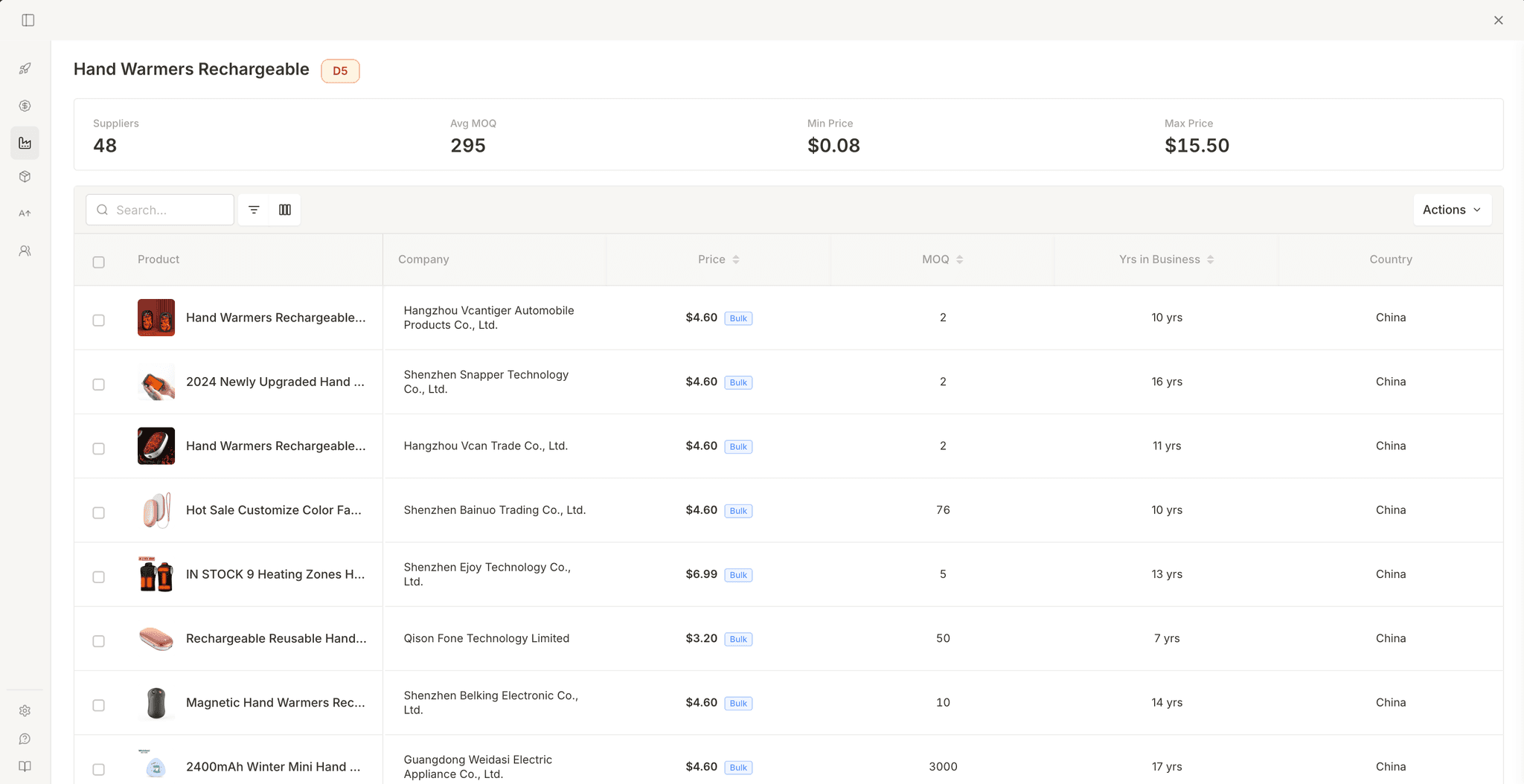
Overview
When you find a product to source, find its manufacturer and cost. Open the Supplier tab. Launch Fast uses your Amazon keyword to search Alibaba for related manufacturers. The results give prices, minimum order quantities, years in business, and Alibaba trust status.
Finding Suppliers
Supplier data loads automatically, no setup or selection needed.
Open the dashboard
On an Amazon search or product page, click the chart icon on the banner or a product card. The Launch Fast modal opens.
Switch to Supplier Research
Click Supplier Research in the sidebar. The extension begins searching for suppliers matching your keyword. A notification shows "Finding suppliers..." while results load.
Browse results
Suppliers appear in a sortable table with product images, pricing, MOQ, and company details. Each search returns up to 20 suppliers.
Results only include Gold Suppliers with Trade Assurance by default, which are Alibaba's verified and protected seller tiers. Unverified listings are excluded.
KPI Strip
Four metrics summarize supplier results. The Min/Max price range tells you if manufacturing costs are tightly grouped (established pricing) or spread out (different quality tiers or materials).

| KPI | What it measures |
|---|---|
| Suppliers | Total number of suppliers found |
| Avg MOQ | Average minimum order quantity across all suppliers |
| Min Price | Lowest unit price found |
| Max Price | Highest unit price found |
Supplier Table
Each supplier in one table, sortable by price, MOQ, and years in business, with the following columns.
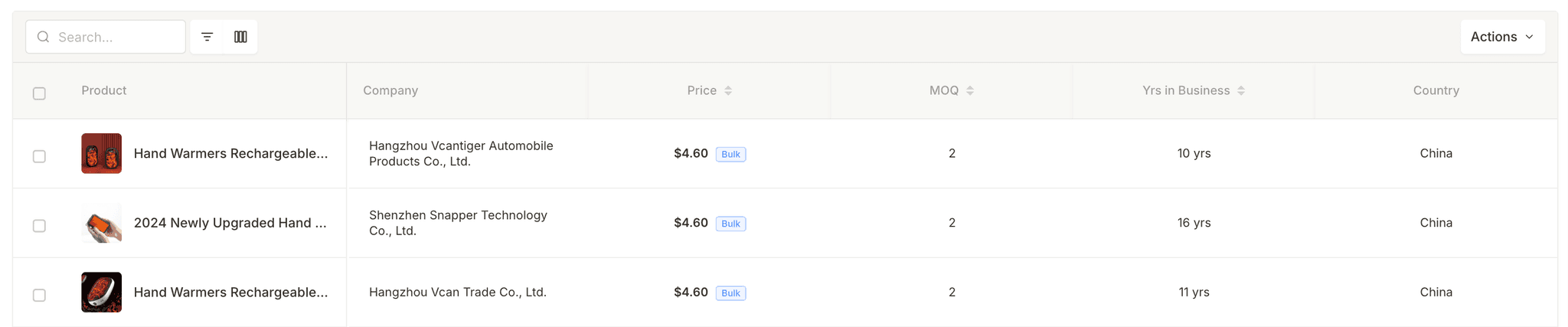
| Column | What it shows | Sortable |
|---|---|---|
| Product | Product image + linked title (opens Alibaba listing in new tab) | — |
| Company | Supplier company name | — |
| Price | Unit price, with "Bulk" badge for tiered pricing | Yes |
| MOQ | Minimum order quantity | Yes |
| Yrs in Business | How long the supplier was on Alibaba | Yes |
| Country | Supplier's country (e.g., China, Vietnam, India) | — |
Tiered Pricing
Some suppliers offer volume discounts, shown as a Bulk badge next to the price. Hover over the badge to see all tiers. The table shows the lowest tier price for the highest volume. Your first order will usually have the highest unit price.

| Quantity | Price |
|---|---|
| 1–100 pcs | $1.50 |
| 101–500 pcs | $1.25 |
| 501–1,000 pcs | $1.10 |
| 1,000+ pcs | $0.95 |
Saving Suppliers
Save suppliers to a collection so you can compare them across research sessions.
Select suppliers
Click the checkboxes next to suppliers you want to save. Use the header checkbox to select all visible rows.
Open Actions
Click the Actions dropdown in the toolbar. Choose "Save to Collection".
Pick or create a collection
A picker dialog appears. Select an existing supplier collection or type a name to create a new one. Click Save. The selected suppliers and all their metadata (pricing, MOQ, tiers, company info) are stored.
Saved suppliers keep all their data, including tiered pricing. You can browse them later from the Collections section in the sidebar.
Export to Excel
The Actions dropdown also has Export to Excel, which downloads all suppliers (not just selected) as an .xlsx spreadsheet with each column.
Best Practices
How to evaluate and shortlist suppliers effectively.
- Compare 5+ suppliers before reaching out. Sort by price, compare MOQs, and check years in business. Experienced suppliers (5+ years) typically offer better quality control and communication.
- Use tiered pricing to plan your budget. Hover over the Bulk badge to see volume discounts. Use the lowest tier price for the best-case margin. Use the highest tier price for the worst-case margin.
- Always verify on Alibaba directly. Click the product title to open the listing. Check transaction history, response rate, and recent reviews before requesting a quote.
- Cross-reference with the profit calculator. Plug supplier prices in as your COGS, add estimated shipping, and see the real margin. A low unit price with a high MOQ might not work if you cannot sell through the inventory fast enough.
Frequently Asked Questions
Common questions about supplier research.